
Split work into threads
Have Plot start a thread for each part of a large job, and coordinate them from one parent thread.
For a large job with separate parts, ask Plot to split it into threads. Plot starts a thread for every part with a short brief, and reports back in the thread you started.
Ask for a split
Name the parts and where you want progress reported.
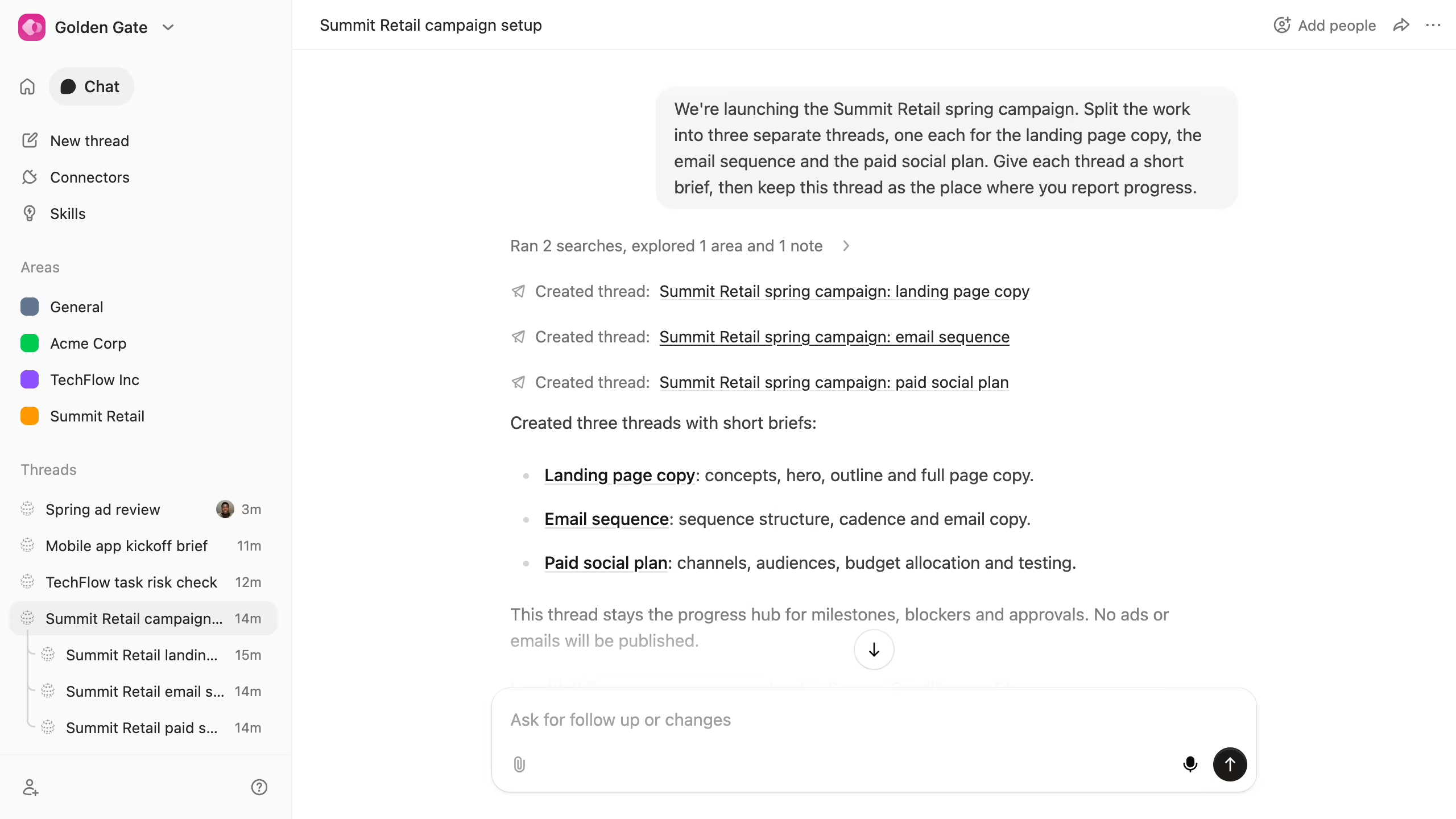
We're launching the Summit Retail spring campaign. Split the work into threads for the landing page copy, the emails and the paid social plan. Keep this thread as the place where you report progress.
Plot shows Created thread with a link for every new thread.
How the threads work
- The Chat sidebar lists the new threads under their parent. Hover the parent's icon to fold its threads.
- The new threads have the same people as their parent.
- Plot can send messages between the threads. The receiving thread shows Message from and the sending thread's title.
- A thread that Plot started cannot start more threads.
Open a thread to steer that part, or stay in the parent and ask for a status update across all the threads.
When to split work
Split work when the parts can move on their own, such as the pieces of a launch. Keep the work in one thread when every step needs the step before it.